

1. ご注意
まず初めに、注意事項に関して記載します。
1.1 Lychee Redmine インストール時の注意事項
- Lychee Redmine は Redmine のデータベース構造を変更するなど、Redmine に対して大幅な拡張をしているものが含まれております。
- インストール前に必ず既存環境のバックアップを取得してください。
1.2 Redmine バージョンアップ時の注意事項
Redmine をバージョンアップした際は、以下のコマンドの実行が必要になる場合があります。バージョンアップ後に実行してください。
1.2.1 トラッカー設定フィールドの修正(Redmine 3.4 以上へのアップデート時)
トラッカー設定画面で「実開始日」「実終了日」がOFFの状態で Redmine 3.4 以上にアップデートすると、標準フィールドの「説明」がOFFになり「実終了日」がONになる問題が発生します。
Redmineのバージョンアップ後、以下のコマンドを実行してください。
$ cd /var/rails/redmine
$ RAILS_ENV=production bundle exec rake redmine:plugins:lad:correct_fields_bits
1.2.2 ガントチャート表示の修正(Redmine 4.0 以上へのアップデート時)
Lychee ガントチャート v3.9.5 以上をインストール済みの状態で Redmine 4.0 以上にアップデートすると、ガントチャートが表示できなくなる場合があります。
Redmineのバージョンアップ後、以下のコマンドを実行してください。
$ cd /var/rails/redmine
$ RAILS_ENV=production bundle exec rake redmine:plugins:lgc:fix_lgc_options_type
1.2.3 Lycheeプロジェクトビューのブックマーク機能のデータ移行(Redmine4.1未満のバージョンからのアップデート時)
Redmine 4.1 からRedmine標準機能としてプロジェクトのブックマーク機能が実装されました。それに伴いLycheeプロジェクトビュープラグインのブックマークデータを移行する必要があります。
移行のため下記コマンドを実行してください。
bundle exec rake redmine:plugins:lychee_project_view:conversion_bookmark_project RAILS_ENV=production1.3 ライセンス更新時の注意事項
ライセンス更新時はRedmineの画面上からは更新できません。以下の手順で更新する必要があります。 ※ライセンス更新は、ライセンスの有効期限前後にかかわらず、本手順で実施してください。
1.事前に新しいライセンスを入手してください。
2.新しいライセンス入手後、以下のコマンドで更新してください。
RAILS_ENV=production bin/rails redmine:plugins:alm:register_authenticate_code['ここに認証コード', 'ここに登録コード']1.4 ライセンス有効期限に伴うアンインストール時の注意事項
ライセンスの有効期限前後で、Lychee Redmineのアンインストール手順が異なります。
1.4.1 ライセンスが切れた後の場合
⚠️もしも期限が切れた場合、Redmine自体が動かなくなります。
Lychee Redmineをアンインストールしてください。
Lychee Redmineのアンインストールコマンドは以下になります。
# アンインストール実行
bash plugins/alm/bin/uninstall_lychee.sh

# dry-run(実際の変更を行わず確認のみ)
bash plugins/alm/bin/uninstall_lychee.sh --dry-run
1.4.2 ライセンスが切れる前の場合
アンインストールは補足. Timed版Lychee Redmineのアンインストールをご参照ください。
ご不明な点がありましたら弊社までお問い合わせ下さい。
2. 環境
ここでは本マニュアルにおけるインストール環境やファイル構成などに関して記載します。
2.1 想定インストール環境
本マニュアルは以下の環境にインストールすることを想定しています。ご使用の環境に合わせて、適宜読み替えていただきますようお願いいたします。
| 項目 | 値 |
|---|---|
| OS | Linux 64bit |
| Redmine ルートディレクトリ | /var/rails/redmine |
| rgloader 展開先 | /tmp |
| Lychee Redmine 展開先 | /tmp/LycheeRedmine |
2.2 各ファイルについて
下記のディレクトリは、ご利用プラグインの種類に関係なく配置していただきますようお願いいたします。
- rgloader
プラグインの種類によっては複数のディレクトリを配置する必要があります。以下をご参照いただき、ご購入内容に合わせてマニュアルを適宜読み替えてください。
| 契約内容 | プラグイン名 |
|---|---|
| Lycheeベーシック | alm lychee_version_start_date lychee_project_view lychee_easy_assigned_user lychee_workdays lychee_issue_spread_sheet lychee_status_color lychee_profile_icon lychee_notification lychee_help lychee_project_term lychee_message_box lychee_project_dashboard lychee_issueform |
| Lycheeアジャイル(Neoバックログ) | lychee_agile |
| Lycheeスケジュール管理(ガントチャート) | lgc lgc_pro |
| Lycheeガントチャート5 | lychee_gantt_chart |
| Lycheeスケジュール管理(カンバン) | lychee_kanban |
| Lycheeスケジュール管理(チケットセット) | lychee_issue_set |
| Lycheeスケジュール管理(プロジェクトテンプレート) | lpt |
| Lycheeスケジュール管理(アクチュアルデイト) | lad |
| Lychee工数リソース管理(タイムマネジメント) | lychee_time_management lychee_work_plan |
| Lychee工数リソース管理(リソースマネジメント) | lrm |
| Lycheeチケット関連図 | lac |
| Lycheeコストマネジメント | lychee_cost |
| Lychee EVM | levm lychee_issues_evm |
| Lycheeプロジェクトレポート | lychee_project_report |
| Lycheeカスタムフィールド | lychee_custom_field |
| Lychee SAML認証 | lychee_saml_auth |
| Lychee CCPM | lychee_ccpm lychee_remaining_estimate |
| Lycheeグループ | lychee_groups |
| Lychee 機械管理 | lychee_manufacturing |
| Lycheeフィルター | lychee_filter |
3. 移行パターン別手順
3.1 評価版 → 買取版
以下の1〜4の手順で実施ください。
3.2 評価版 → Timed版
以下の1〜4の手順で実施ください。
3.3 Timed版 → 買取版
以下の1〜4の手順で実施ください。
4. 共通手順:利用しないプラグインのデータ初期化
- 既に導入しているプラグインのうち、継続して使用しないプラグインのデータを初期化する必要があります。
- 使用しないプラグインに対して、下記コマンドを実行してデータを初期化してください。
- 実行すると該当プラグインのデータは削除されます。継続使用するプラグインに対してはコマンドを実行しないようお願いいたします。
4.1 プラグイン別データ初期化コマンド
4.1.1 Lycheeベーシック(ステータスカラー)
$ cd /var/rails/redmine
$ RAILS_ENV=production bundle exec rake redmine:plugins:migrate NAME=lychee_status_color VERSION=0
4.1.2 Lycheeダッシュボードのデータ初期化
$ cd /var/rails/redmine
$ RAILS_ENV=production bundle exec rake redmine:plugins:migrate NAME=lychee_project_dashboard VERSION=0
4.1.3 Lycheeアジャイル(Neoバックログ)のデータ初期化
$ cd /var/rails/redmine
$ RAILS_ENV=production bundle exec rake redmine:plugins:migrate NAME=lychee_agile VERSION=0
4.1.4 Lycheeスケジュール管理(ガントチャート)のデータ初期化
$ cd /var/rails/redmine
$ RAILS_ENV=production bundle exec rake redmine:plugins:migrate NAME=lgc VERSION=0
$ RAILS_ENV=production bundle exec rake redmine:plugins:migrate NAME=lgc_pro VERSION=0
4.1.5 Lycheeスケジュール管理(カンバン)のデータ初期化
$ cd /var/rails/redmine
$ RAILS_ENV=production bundle exec rake redmine:plugins:migrate NAME=lychee_kanban VERSION=0
4.1.6 Lycheeスケジュール管理(チケットセット)のデータ初期化
$ cd /var/rails/redmine
$ RAILS_ENV=production bundle exec rake redmine:plugins:migrate NAME=lychee_issue_set VERSION=0
4.1.7 Lychee工数リソース管理(タイムマネジメント)のデータ初期化
$ cd /var/rails/redmine
$ RAILS_ENV=production bundle exec rake redmine:plugins:migrate NAME=lychee_time_management VERSION=0
$ RAILS_ENV=production bundle exec rake redmine:plugins:migrate NAME=lychee_work_plan VERSION=0
4.1.8 Lychee工数リソース管理(リソースマネジメント)のデータ初期化
$ cd /var/rails/redmine
$ RAILS_ENV=production bundle exec rake redmine:plugins:migrate NAME=lrm VERSION=0
4.1.9 Lycheeチケット関連図のデータ初期化
$ cd /var/rails/redmine
$ RAILS_ENV=production bundle exec rake redmine:plugins:migrate NAME=lac VERSION=0
4.1.10 Lycheeコストマネジメントのデータ初期化
$ cd /var/rails/redmine
$ RAILS_ENV=production bundle exec rake redmine:plugins:migrate NAME=lychee_cost VERSION=0
4.1.11 Lychee EVMのデータ初期化
$ cd /var/rails/redmine
$ RAILS_ENV=production bundle exec rake redmine:plugins:migrate NAME=levm VERSION=0
$ RAILS_ENV=production bundle exec rake redmine:plugins:migrate NAME=lychee_issues_evm VERSION=0
4.1.12 Lycheeプロジェクトレポートのデータ初期化
$ cd /var/rails/redmine
$ RAILS_ENV=production bundle exec rake redmine:plugins:migrate NAME=lychee_project_report VERSION=0
4.1.13 Lycheeカスタムフィールドのデータ初期化
$ cd /var/rails/redmine
$ RAILS_ENV=production bundle exec rake redmine:plugins:migrate NAME=lychee_custom_field VERSION=0
4.1.14 Lychee SAML認証のデータ初期化
$ cd /var/rails/redmine
$ RAILS_ENV=production bundle exec rake redmine:plugins:migrate NAME=lychee_saml_auth VERSION=0
4.1.15 Lychee CCPMのデータ初期化
$ cd /var/rails/redmine
$ RAILS_ENV=production bundle exec rake redmine:plugins:migrate NAME=lychee_CCPM VERSION=0
$ RAILS_ENV=production bundle exec rake redmine:plugins:migrate NAME=lychee_remaining_estimate VERSION=0
4.1.16 Lycheeグループのデータ初期化
$ cd /var/rails/redmine
$ RAILS_ENV=production bundle exec rake redmine:plugins:migrate NAME=lychee_groups VERSION=0
4.1.17 Lychee機械管理のデータ初期化
$ cd /var/rails/redmine
$ RAILS_ENV=production bundle exec rake redmine:plugins:migrate NAME=lychee_manufacturing VERSION=0
4.1.18 Lycheeフィルターのデータ初期化
$ cd /var/rails/redmine
$ RAILS_ENV=production bundle exec rake redmine:plugins:migrate NAME=lychee_filter VERSION=0
5. 共通手順:認証情報
5.1 認証情報の削除
Railsコンソールを起動してください。プロンプト(>)が表示されていることを確認してください。
$ cd /var/rails/redmine
$ bundle exec rails console production

*プロンプト表示例
2.1.1 :001>
以下のコマンドを実行してください。
> Registration.delete_allRailsコンソールを終了してください。
> quit5.2 Timed版ライセンス認証
Railsコンソールを起動してください。プロンプト(>)が表示されていることを確認してください。
$ cd /var/rails/redmine
$ bundle exec rails console production

*プロンプト表示例
2.1.1 :001>
以下のコマンドを実行してください。
> registration = Registration.first_or_initialize
> registration.authenticate_code = "認証コード"
> registration.registration_code = "登録コード"
> registration.save
「=> true」と表示されれば完了です。Railsコンソールを終了してください。
> quit6. 共通手順:アンインストール
以下のコマンドを実行してください。
このコマンドではデータは削除されません。
$ cd /var/rails/redmine
$ rm -rf plugins/{alm,lad,lpt,lychee_version_start_date,lychee_issue_form,lychee_project_view,lychee_easy_assigned_user,lychee_workdays,lychee_issue_spread_sheet,lychee_status_color,lychee_profile_icon,lychee_notification,lychee_project_term,lychee_message_box,lychee_help,lychee_project_dashboard,lgc,lgc_pro,lychee_gantt_chart,lychee_kanban,lychee_issue_set,lychee_time_management,lychee_work_plan,lrm,lac,lychee_cost,levm,lychee_issues_evm,lychee_project_report,lychee_custom_field,lychee_saml_auth,lychee_ccpm,lychee_remaining_estimate,lychee_groups,lychee_manufacturing,lychee_filter,lychee_agile}
7. 共通手順:配置・インストール
7.1 圧縮ファイルの配置/展開
- ダウンロードした圧縮ファイルを、インストール対象のサーバー上に配置して解凍してください。
- Linux用ファイルをWindows上で解凍すると実行権限が失われる場合があります。必ずLinux環境上で解凍してください。
- 本マニュアルでは、以下の場所へ展開されているものとして説明します。
| 対象 | 配置先 |
|---|---|
| rgloader | /tmp |
| Lychee Redmineプラグイン | /tmp/LycheeRedmine |
7.2 プラグイン配置時の重要な注意点
Lychee Redmine の一部製品は、「まとめフォルダ」の中に複数のプラグインフォルダが格納されています。まとめフォルダ自体を配置するのではなく、中に含まれる各プラグインフォルダを plugins ディレクトリへ配置してください。
対象となるまとめフォルダ
lychee_basiclgclevmlychee_ccpmlychee_time_management
配置例(lychee_basic の場合)
以下は lychee_basic を解凍した場合の例です。
lychee_basic/
├── alm
├── lychee_help
├── lychee_notification
└── lychee_project_dashboard
NG例:
/plugins/lychee_basicOK例:
/plugins/alm
/plugins/lychee_help
/plugins/lychee_notification
/plugins/lychee_project_dashboard
つまり、まとめフォルダの中にある各プラグインフォルダを、直接 plugins ディレクトリへ配置してください。
7.3 プラグインの配置
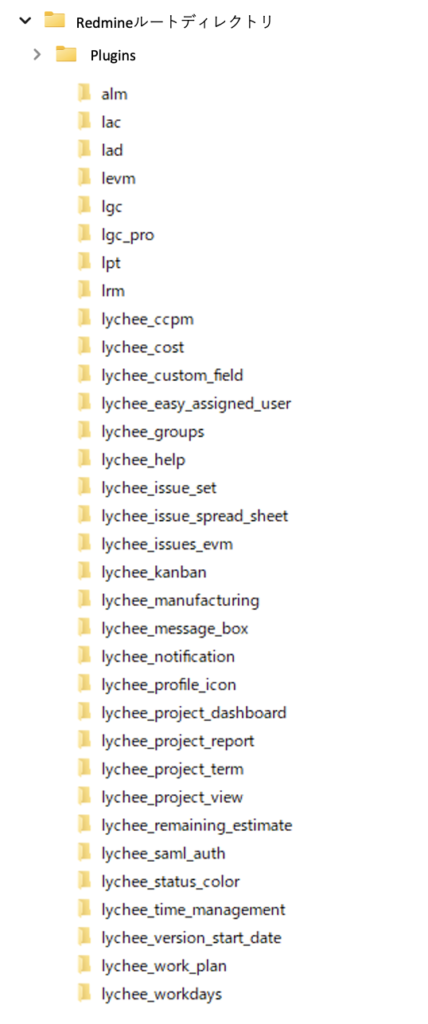
展開したプラグインを Redmine の plugins ディレクトリへ配置します。
$ cp -R /tmp/LycheeRedmine/* /var/rails/redmine/plugins参考イメージ:Lycheeプラグインをplugins以下にすべて配置した場合
7.4 ファイルオーナーの確認
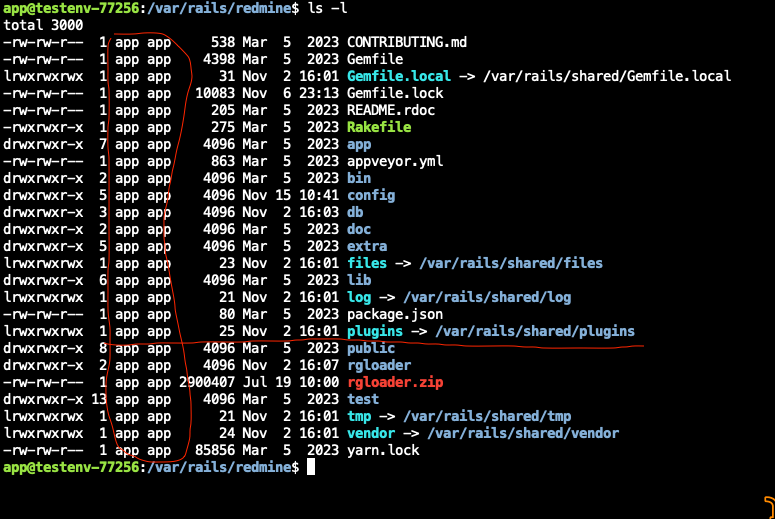
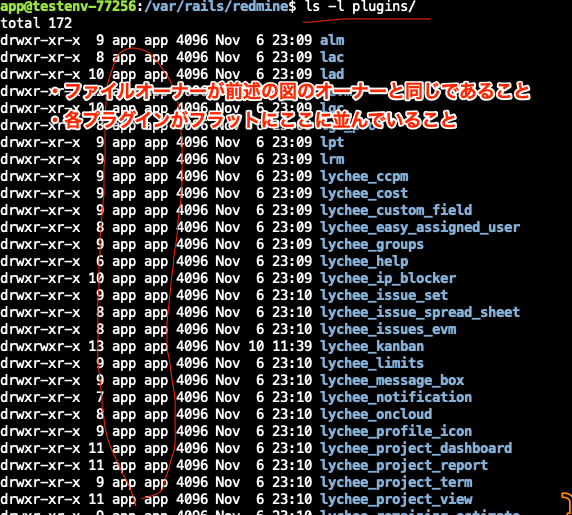
plugins ディレクトリ配下の所有者が root になっている場合、Redmine が正常に動作しない場合があります。必要に応じて chown -R コマンドで適切な所有者へ変更してください。
例:
$ chown -R redmine:redmine /var/rails/redmine/plugins※ ユーザー名・グループ名はお客様環境に合わせて変更してください。
参考イメージ:
7.5 必要ライブラリのインストール
$ cd /var/rails/redmine
$ bundle install --without 'development test'
7.6 DB・リソースファイルセットアップ
$ cd /var/rails/redmine
$ bin/rails redmine:plugins RAILS_ENV=production
Redmine6以上の場合は以下も実行してください。
$ bin/rails assets:clobber assets:precompile RAILS_ENV=production7.7 サブディレクトリ方式(Sub-URI)で運用されている場合のセットアップ
RAILS_RELATIVE_URL_ROOT の設定が必要です。例は以下の通りです。
$ bin/rails assets:clobber assets:precompile RAILS_ENV=production RAILS_RELATIVE_URL_ROOT=/foo Sub-URI を使っている場合は rake や bin/rails コマンドを使用する際に常にRAILS_RELATIVE_URL_ROOT の変数をセットが必要になります。または config.relative_url_root = “/foo” をセットしてください。
※ ”/foo” はお客様の環境にあわせたフォルダ名を入力してください。
7.8 Redmineインスタンスの再起動
- ご使用の環境に合わせた、Redmineインスタンスの再起動を行ってください。
- 起動する際は、必ず「production環境」として起動してください。
$ cd /var/rails/redmine
$ bundle exec rails server -e production
7.9 Lychee製品の有効化
以下のプラグインはプロジェクトごとにモジュールの有効/無効を切り替えられるようになっております。対象プロジェクトの「設定」→「モジュール」より、対象プラグインを有効化してください。
- Lycheeスケジュール管理(ガントチャート)
- Lycheeスケジュール管理(ガントチャート5)
- Lycheeアジャイル(Neoバックログ)
- Lycheeスケジュール管理(カンバン)
- Lycheeスケジュール管理(バックログ)
- Lycheeスケジュール管理(チケットセット)
- Lychee工数リソース管理(タイムマネジメント)
- Lychee工数リソース管理(リソースマネジメント)
- Lycheeチケット関連図
- Lycheeコストマネジメント
- Lychee EVM
- Lycheeプロジェクトレポート
- Lycheeカスタムフィールド
- Lychee CCPM
- Lycheeダッシュボード
以上で移行は完了です。
8. 補足
以下、製品や機能ごとに必要となる補足設定を記載します。ご利用の機能に応じて設定してください。
8.1 PDF出力を使用する場合(Lychee ガントチャート 5 v5.1.0 以上)
Lychee ガントチャート 5 v5.1.0 以上でPDF出力を使用する場合は、Chromium のインストールおよび環境変数の設定が必要です。
以下の環境変数を設定してください。
$ LYCHEE_GANTT_CHART_CHROME_NO_SANDBOX=1Chromium のインストール手順(Ubuntu 24.04 の例)
以下の URL から chrome-headless-shell をダウンロードし、Redmine ルートディレクトリに配置してください。
$ # ダウンロードして展開
$ wget https://storage.googleapis.com/chrome-for-testing-public/135.0.7004.0/linux64/chrome-headless-shell-linux64.zip
$ unzip chrome-headless-shell-linux64.zip
$ mv chrome-headless-shell-linux64 /var/rails/redmine/chrome

$ # シンボリックリンクの作成
$ ln -s /var/rails/redmine/chrome/chrome-headless-shell /var/rails/redmine/chrome/chrome注意:シンボリックリンクでは期待通りに動作しない場合があります。
chromeコマンドのパスは、リンク先のファイルをフルパスで指定してください。
Chromium の動作に必要なライブラリをインストールしてください。
$ apt update && apt install -y --no-install-recommends ca-certificates fonts-liberation libasound2 libatk-bridge2.0-0 libatk1.0-0 libatspi2.0-0 libc6 libcairo2 libcups2 libdbus-1-3 libdrm2 libexpat1 libgbm1 libglib2.0-0 libgtk-3-0 libnspr4 libnss3 libpango-1.0-0 libx11-6 libx11-xcb1 libxcb1 libxcomposite1 libxcursor1 libxdamage1 libxext6 libxfixes3 libxi6 libxrandr2 libxrender1 libxss1 libxtst6 wget unzip xdg-utilsSystemd 環境での追加設定
Systemd を使用している環境では、MemoryDenyWriteExecute および RestrictNamespaces が有効になっているとPDF出力が動作しない場合があります。Redmine の service ファイルで該当行をコメントアウトしてください。
# MemoryDenyWriteExecute=true
# RestrictNamespaces=true
AppArmor が有効な環境での追加設定
/etc/apparmor.d/chrome-lychee-redmine を以下の内容で作成してください。
abi <abi/4.0>,
include <tunables/global>

profile chrome {chromeのパス} flags=(unconfined) {
  userns,

  # Site-specific additions and overrides. See local/README for details.
  include if exists <local/chrome>
}
作成後、以下のコマンドで AppArmor をリロードしてください。
$ sudo service apparmor reload注意:
{chromeのパス}には、シンボリックリンクではなく、リンク先のファイルをフルパスで指定してください。
8.2 lychee_themes プラグインを使用する場合
plugins/lychee_themes/assets/themes フォルダへの書き込み権限を確認してください。
8.3 Lycheeガントチャート チケットステータスの表示色設定
- チケットのステータスの表示色を自動で設定する場合は、Redmineのルートディレクトリで以下のコマンドを実行してください。
- 管理画面から手動で設定する場合は、以下のコマンド実行は不要です。
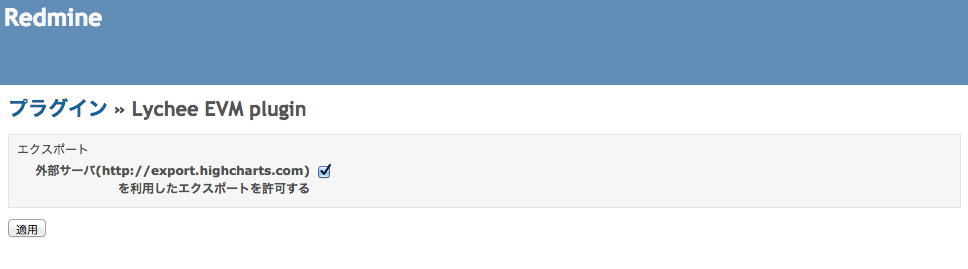
$ RAILS_ENV=production bundle exec rake redmine:plugins:lychee_status_color:set_default_status_colors8.4 Lychee EVM エクスポート時の外部サーバーへの接続許可設定
- システム管理者でログインし、管理 > プラグイン > Lychee EVM > 設定 画面から設定できます。
- 設定をオフにした場合は、エクスポートボタンが印刷ボタンになります。
8.5 Lychee EVM スナップショット作成
- Lychee EVMでは、スナップショットを取得しておくことで、現在と過去の状況を比較できます。
- スナップショット機能を有効にする場合は、以下のコマンドをcronタスクとして設定してください。
- 業務に影響がおよばないよう、一日一回以下かつ深夜に実行することをおすすめします。
- プロジェクト数やスナップショットを保存する頻度によっては、データベースの容量が大きくなるためご注意ください。
$ RAILS_ENV=production bundle exec rake redmine:plugins:levm:snapshot:fixed8.6 Lycheeプロジェクトレポート 集計データの生成設定
- プロジェクトレポートを生成する前に以下の設定が必要です。
- 集計タスクの登録レポートに必要な集計データを生成するため、以下のコマンドを毎日一回実行するよう、cronタスクとして設定してください。
- 業務に影響がおよばないよう、深夜に実行することをおすすめいたします。
$ RAILS_ENV=production bundle exec rake redmine:plugins:lychee_project_report:daily_reporting8.7 Lycheeプロジェクトレポート 指標サンプルの作成
- Lycheeプロジェクトレポートでは、インストール時に使用例として指標のサンプルがいくつか作成されます。
- 削除した場合は、以下のコマンドで再作成できます。
$ RAILS_ENV=production bundle exec rake redmine:plugins:lychee_project_report:add_indice_settings8.8 Lychee CCPM フィーバーチャートの描画データ生成設定
- Lychee CCPMでは、フィーバーチャートを描画するために集計データの生成設定が必要です。
- フィーバーチャートに必要な集計データを生成するため、以下のコマンドを毎日一回実行するようcronタスクとして設定してください。
- 業務に影響がおよばないよう、深夜に実行することをおすすめします。
$ RAILS_ENV=production bundle exec rake redmine:plugins:lychee_ccpm:aggregate_consumption_rates8.9 Lychee CCPM フィーバーチャートの期日の自動更新設定
- Lychee CCPMでは、残工数からチケットの期日を自動で更新できます。
- 自動更新を行う場合は、システム管理者でログインし、該当プロジェクトの 設定 > CCPM タブで「バッチ処理で残工数からチケットの期日を自動更新する」にチェックを入れてください。
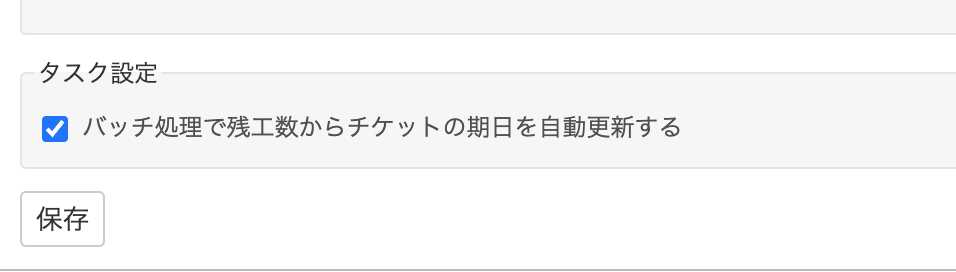
- また、以下のコマンドを毎日一回実行するようcronタスクとして設定してください。
- 業務に影響がおよばないよう、深夜に実行することをおすすめします。
$ RAILS_ENV=production bundle exec rake redmine:plugins:lychee_ccpm:calculate_due_date_for_issues8.10 Lycheeタイムマネジメント 予定の実績変換設定(カレンダー形式をご利用の場合のみ)
Lycheeタイムマネジメントの表示形式には、表形式とカレンダー形式があります。デフォルトは表形式ですが、カレンダー形式を選択した場合は以下の設定が必要です。
- 入力された作業予定を作業実績に変換するため、以下のコマンドを毎時間一回実行するよう、タスクスケジューラーで設定してください。
- 設定中のタイムゾーンにより、コマンドが実行された時刻が深夜0時台となるユーザーの作業予定が作業実績に変換されます。
- ユーザーのタイムゾーンが未設定の場合、Redmineが動作しているタイムゾーンが設定されているものとして扱われます。
- サーバーの時計の時刻が実際の時刻とずれる可能性を考慮し、毎時0分ではなく、毎時5分などに実行することをおすすめします。
$ RAILS_ENV=production bundle exec rake redmine:plugins:lychee_time_management:work_plans_to_time_entries8.11 LycheeIssueForm チケット更新時のメール通知設定
- IssueFormでチケットを更新した場合、更新内容はそのままではメール通知されません。
- 更新内容をメール通知するには、以下のコマンドを定期実行するようcronタスクとして設定してください。
- 長い時間間隔に設定すると、更新後すぐにメールが届かない、または複数の更新内容が一度のメールにまとめられて確認しにくくなる場合があります。
- そのため、毎時5分などに実行することをおすすめします。
- なお、定期実行時に更新内容が複数ある場合は、チケットごとに複数の内容がメール本文にまとめて通知されます。
$ RAILS_ENV=production bundle exec rake redmine:plugins:lychee_issue_form:send_notification_for_journals9. Lychee Redmineのアンインストール手順
アンインストール手順について記載します。
⚠️ 警告: アンインストールを実行するとプラグインに関連するデータが完全に削除されます。必ず事前にバックアップを取得してください。
各プラグインのマイグレーションを 0 にリセットしてからディレクトリを削除してください。
$ cd /var/rails/redmine

$ RAILS_ENV=production bundle exec rake redmine:plugins:migrate NAME=lad VERSION=0
$ RAILS_ENV=production bundle exec rake redmine:plugins:migrate NAME=lpt VERSION=0
$ RAILS_ENV=production bundle exec rake redmine:plugins:migrate NAME=lychee_version_start_date VERSION=0
$ RAILS_ENV=production bundle exec rake redmine:plugins:migrate NAME=lychee_issue_form VERSION=0
$ RAILS_ENV=production bundle exec rake redmine:plugins:migrate NAME=lychee_project_view VERSION=0
$ RAILS_ENV=production bundle exec rake redmine:plugins:migrate NAME=lychee_easy_assigned_user VERSION=0
$ RAILS_ENV=production bundle exec rake redmine:plugins:migrate NAME=lychee_workdays VERSION=0
$ RAILS_ENV=production bundle exec rake redmine:plugins:migrate NAME=lychee_issue_spread_sheet VERSION=0
$ RAILS_ENV=production bundle exec rake redmine:plugins:migrate NAME=lychee_status_color VERSION=0
$ RAILS_ENV=production bundle exec rake redmine:plugins:migrate NAME=lychee_profile_icon VERSION=0
$ RAILS_ENV=production bundle exec rake redmine:plugins:migrate NAME=lychee_notification VERSION=0
$ RAILS_ENV=production bundle exec rake redmine:plugins:migrate NAME=lychee_project_term VERSION=0
$ RAILS_ENV=production bundle exec rake redmine:plugins:migrate NAME=lychee_message_box VERSION=0
$ RAILS_ENV=production bundle exec rake redmine:plugins:migrate NAME=lychee_help VERSION=0
$ RAILS_ENV=production bundle exec rake redmine:plugins:migrate NAME=lychee_checklist VERSION=0
$ RAILS_ENV=production bundle exec rake redmine:plugins:migrate NAME=lychee_project_dashboard VERSION=0
$ RAILS_ENV=production bundle exec rake redmine:plugins:migrate NAME=lgc VERSION=0
$ RAILS_ENV=production bundle exec rake redmine:plugins:migrate NAME=lgc_pro VERSION=0
$ RAILS_ENV=production bundle exec rake redmine:plugins:migrate NAME=lychee_gantt_chart VERSION=0
$ RAILS_ENV=production bundle exec rake redmine:plugins:migrate NAME=lychee_kanban VERSION=0
$ RAILS_ENV=production bundle exec rake redmine:plugins:migrate NAME=lychee_issue_set VERSION=0
$ RAILS_ENV=production bundle exec rake redmine:plugins:migrate NAME=lychee_time_management VERSION=0
$ RAILS_ENV=production bundle exec rake redmine:plugins:migrate NAME=lychee_work_plan VERSION=0
$ RAILS_ENV=production bundle exec rake redmine:plugins:migrate NAME=lrm VERSION=0
$ RAILS_ENV=production bundle exec rake redmine:plugins:migrate NAME=lac VERSION=0
$ RAILS_ENV=production bundle exec rake redmine:plugins:migrate NAME=lychee_cost VERSION=0
$ RAILS_ENV=production bundle exec rake redmine:plugins:migrate NAME=levm VERSION=0
$ RAILS_ENV=production bundle exec rake redmine:plugins:migrate NAME=lychee_issues_evm VERSION=0
$ RAILS_ENV=production bundle exec rake redmine:plugins:migrate NAME=lychee_project_report VERSION=0
$ RAILS_ENV=production bundle exec rake redmine:plugins:migrate NAME=lychee_custom_field VERSION=0
$ RAILS_ENV=production bundle exec rake redmine:plugins:migrate NAME=lychee_saml_auth VERSION=0
$ RAILS_ENV=production bundle exec rake redmine:plugins:migrate NAME=lychee_ccpm VERSION=0
$ RAILS_ENV=production bundle exec rake redmine:plugins:migrate NAME=lychee_remaining_estimate VERSION=0
$ RAILS_ENV=production bundle exec rake redmine:plugins:migrate NAME=lychee_groups VERSION=0
$ RAILS_ENV=production bundle exec rake redmine:plugins:migrate NAME=lychee_manufacturing VERSION=0
$ RAILS_ENV=production bundle exec rake redmine:plugins:migrate NAME=lychee_themes VERSION=0
$ RAILS_ENV=production bundle exec rake redmine:plugins:migrate NAME=alm VERSION=0
$ RAILS_ENV=production bundle exec rake redmine:plugins:migrate NAME=lychee_agile VERSION=0
$ RAILS_ENV=production bundle exec rake redmine:plugins:migrate NAME=lychee_filter VERSION=0
マイグレーションの実行後、以下のコマンドでファイルを削除してください。
$ rm -rf rgloader
$ rm -rf public/plugin_assets/{alm,lad,lpt,lychee_version_start_date,lychee_issue_form,lychee_project_view,lychee_easy_assigned_user,lychee_workdays,lychee_issue_spread_sheet,lychee_status_color,lychee_profile_icon,lychee_notification,lychee_project_term,lychee_message_box,lychee_help,lychee_checklist,lychee_project_dashboard,lgc,lgc_pro,lychee_gantt_chart,lychee_kanban,lychee_issue_set,lychee_time_management,lychee_work_plan,lrm,lac,lychee_cost,levm,lychee_issues_evm,lychee_project_report,lychee_custom_field,lychee_saml_auth,lychee_ccpm,lychee_remaining_estimate,lychee_groups,lychee_manufacturing,lychee_themes,lychee_filter,lychee_agile}
$ rm -rf plugins/{alm,lad,lpt,lychee_version_start_date,lychee_issue_form,lychee_project_view,lychee_easy_assigned_user,lychee_workdays,lychee_issue_spread_sheet,lychee_status_color,lychee_profile_icon,lychee_notification,lychee_project_term,lychee_message_box,lychee_help,lychee_checklist,lychee_project_dashboard,lgc,lgc_pro,lychee_gantt_chart,lychee_kanban,lychee_issue_set,lychee_time_management,lychee_work_plan,lrm,lac,lychee_cost,levm,lychee_issues_evm,lychee_project_report,lychee_custom_field,lychee_saml_auth,lychee_ccpm,lychee_remaining_estimate,lychee_groups,lychee_manufacturing,lychee_themes,lychee_filter,lychee_agile}
削除後、production 環境で Redmine を再起動してください。